

Download Cigati OST Splitter Tool – Free, Secure, and Easy OST File Management for Windows
What Is Cigati OST Splitter Tool? A Powerful Solution for Managing Large OST Files
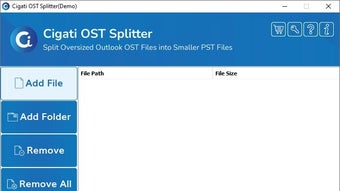
Cigati OST Splitter Tool is a specialized software application designed exclusively for Windows users who need to manage large Outlook Offline Storage (OST) files efficiently. OST files are critical components of Microsoft Outlook, used to store email data when working in cached Exchange mode. Over time, these files can grow significantly in size, leading to performance issues, slow loading times, and even corruption risks. Cigati OST Splitter Tool addresses these challenges by offering a streamlined way to split oversized OST files into smaller, more manageable segments.
Unlike generic file managers, this tool is built specifically for OST file handling, ensuring data integrity during the splitting process. It allows users to divide their OST files by size, date, or folder, giving complete control over how data is organized. Whether you're preparing for backup, migrating data to a new system, or troubleshooting corruption issues, this tool simplifies the workflow. The software is entirely free to download and use, making it an accessible solution for both individual users and small businesses.
One of the standout features is its user-friendly interface. Even users with limited technical knowledge can navigate the tool with ease. The process involves just a few clicks: load the OST file, choose the split criteria, and initiate the split.
The tool runs in the background, providing real-time progress updates. With no installation required—just a simple download and launch—Cigati OST Splitter Tool delivers high performance without cluttering your system. Its lightweight design ensures minimal impact on CPU and memory usage, making it ideal for older or low-spec machines.
Key Features and Benefits of Cigati OST Splitter Tool
- Effortless OST File Splitting – Split large OST files into smaller, manageable parts by size, date, or folder structure.
- Data Integrity Guaranteed – Ensures no data loss or corruption during the splitting process.
- Free to Download and Use – No hidden costs or subscription fees; fully free for personal and commercial use.
- Simple, Intuitive Interface – Designed for users of all skill levels, with minimal learning curve.
- Fast Processing Speed – Optimized algorithms ensure quick splitting without long wait times.
- Supports All Outlook Versions – Compatible with Outlook 2007, 2010, 2013, 2016, 2019, and Microsoft 365.
- Batch Processing Capability – Split multiple OST files in one session for increased productivity.
- No Installation Required – Portable version available; run directly from USB or local drive.
One of the most valuable aspects of this tool is its focus on reliability. OST files are often mission-critical, especially in business environments where email data is irreplaceable. Cigati OST Splitter Tool uses advanced parsing algorithms to read and extract data accurately, preserving all emails, attachments, contacts, calendars, and tasks. This ensures that once the split is complete, each new file remains fully functional and can be reimported into Outlook without issues.
Another notable feature is the ability to split by date ranges. For example, users can separate emails from Q1 2023 into one file and Q2 2023 into another. This is particularly useful for compliance, archiving, or performance optimization. The tool also allows users to define custom file sizes (e.g., 500 MB, 1 GB), making it easy to fit data onto external drives or cloud storage platforms with size limits.
Additionally, the software supports batch processing, meaning you can split multiple OST files simultaneously. This is a time-saver for IT administrators managing data across several user accounts. The output files are saved in standard OST format, ensuring compatibility with Outlook and other email clients. With no need for registration or account creation, the tool maintains privacy and security—your data never leaves your device.
How to Install and Use Cigati OST Splitter Tool on Windows
Installing and using Cigati OST Splitter Tool is a straightforward process that takes less than a minute. Since it’s a portable application, there’s no traditional installation required. Here’s a step-by-step guide to help you get started:
- Download the Software – Visit the official Cigati Solutions website and download the latest version of the OST Splitter Tool. The file is typically under 10 MB, ensuring a fast download even on slow connections.
- Extract the Archive – Once downloaded, extract the ZIP file to a folder of your choice. You’ll find a single executable file (e.g.,
OSTSplitter.exe). - Run the Tool – Double-click the executable file to launch the application. No admin rights are required, and the tool runs in user mode.
- Load Your OST File – Click the “Browse” button and locate the OST file you wish to split. The tool supports both local and network paths.
- Choose Split Criteria – Select your preferred splitting method: by size, date, or folder. You can also set custom file size limits (e.g., 500 MB per file).
- Set Output Location – Choose where you want the split files to be saved. It’s recommended to use a dedicated folder to keep your data organized.
- Start the Split Process – Click “Split” and wait for the process to complete. Progress is displayed in real time, including estimated time remaining.
- Verify the Output – After completion, open one of the split files in Outlook to confirm it’s accessible and intact.
The entire process is intuitive and requires no technical expertise. The tool also includes a built-in log file that records every action taken, which is helpful for troubleshooting or auditing purposes. If you’re splitting multiple files, you can repeat the process or use the batch mode (if available in the version you’re using).
For users concerned about security, Cigati OST Splitter Tool does not collect any personal data or upload files to remote servers. All processing happens locally, ensuring your sensitive email data remains private. The software is also compatible with Windows 7, 8, 10, and 11, making it accessible to a wide range of users.
Pros and Cons of Cigati OST Splitter Tool
Pros
- Free to download and use with no hidden charges
- Lightweight and fast, with minimal system resource usage
- Preserves data integrity during splitting
- Supports all major Outlook versions
- Portable—no installation needed
- Intuitive interface suitable for beginners
- Flexible splitting options (size, date, folder)
- Batch processing for multiple files
Cons
- Currently only available for Windows (no Mac, iOS, or Android support)
- Limited to OST file splitting—no repair or conversion features
- No built-in preview function for OST content
- Supports only local files; no cloud integration
- Minimal documentation or tutorial videos
Frequently Asked Questions (FAQ)
Is Cigati OST Splitter Tool free to download?
Yes, Cigati OST Splitter Tool is completely free to download and use. There are no subscription fees, trial periods, or hidden costs. You can use it for personal or commercial purposes without any restrictions.
Can I split OST files larger than 20 GB?
Yes, the tool is designed to handle large OST files, including those over 20 GB. It splits them efficiently into smaller parts without compromising data integrity.
Does the tool work with Outlook 365?
Yes, Cigati OST Splitter Tool is fully compatible with Microsoft Outlook 365, as well as Outlook 2019, 2016, 2013, 2010, and 2007.
Is my data safe during splitting?
Absolutely. The tool processes files locally on your machine and never uploads your data to any server. All operations are performed securely and privately.
Can I use this tool on Mac or mobile devices?
Currently, Cigati OST Splitter Tool is only available for Windows. There is no native version for Mac, iOS, or Android. However, you can run it on Mac using compatibility layers like Wine, though this is not officially supported.
Final Verdict: Why Cigati OST Splitter Tool Stands Out
Cigati OST Splitter Tool is a reliable, free, and efficient solution for managing large OST files on Windows. Its ability to split files quickly while maintaining data accuracy makes it a must-have for anyone dealing with Outlook performance issues or data organization. While it lacks cross-platform support and advanced features like repair or conversion, its core functionality is executed flawlessly.
For users seeking a secure, lightweight, and no-frills tool to split OST files, this software delivers excellent value. Whether you're an individual managing personal emails or an IT professional handling enterprise data, Cigati OST Splitter Tool simplifies the process without compromising on safety or performance.
Download Cigati OST Splitter Tool today and take control of your OST files with confidence.







